
As the Cvoid-19 pandemic ushered in digital transformation of businesses across the world, more and more companies plan to move to the cloud. How to choose the best cloud migration strategies then becomes a pressing matter. In this article, we are going to explore the ways in which your business can benefit from smooth cloud migration.
What is cloud migration?
Simply put, cloud migration refers to the process of moving data, services, applications, and/or other digital business operations to the cloud. Imagine moving houses, but instead of furniture and belongings, you are moving data, databases, IT resources and other digital assets. While cloud migration can be a great help to companies in general, businesses of different nature need different cloud migration solutions. There are three common cloud migration models: from a local on-premise to the public cloud, from one cloud provider to another cloud provider, and reverse cloud migration—from the cloud to the local data center.
Benefits of cloud migration
Migrating data and applications to public clouds can help enterprises advance their business in many ways as the cloud can provide a better, more effective environment:
Performance
Performance-wise, moving data to the cloud allows you to operate on physical infrastructure that most companies can afford to build or operate. Cloud providers have infrastructure in multiple locations across the world and can therefore provide content/services to end-users from a closer geographical location to minimize latency.
Scalability
Cloud computing allows greater scalability, so you can enjoy greater elasticity, agility, and flexibility while developing your apps or service. It saves you the trouble of buying and setting up physical servers or other storage and network equipment when you need to scale up, making faster delivery time possible.
Cost
Migrating to the cloud saves you money. Not only can you cut down costs on physical computing equipment but also on storage and maintenance of the equipment. Your IT operations considerably cost less once you move to the cloud. The self-service feature in cloud computing allows you to lower your spending on IT staff. Lastly, the pay-per-use option most cloud providers offer cuts unnecessary expenses. These are great reasons for you to consider cloud migration.
Cloud migration strategies
In 2011, IT research firm and consultancy Gartner identified 5 cloud migration strategies for anyone planning to move to the cloud from the on-premise, known as Garner’s 5R:
- Rehost
- Refactor
- Revise
- Rebuild
- Replace
Rehost
Rehosting, sometimes called “lift and shift”, refers to the cloud migration strategy where you deploy existing data and applications to the cloud environment. Taking advantage of an IaaS model, lift and shift is relatively straightforward and an ideal strategy for businesses that want fast migration to the cloud and without modifying the infrastructure.
Refactor
Also known as “lift, tinker, and shift,’ refactor is when you modify and optimize your application for the cloud you are migrating to. When refactoring, you use a PaaS model, changing your applications to better fit cloud-based tools but keeping their core architecture.
Revise
Revising starts with modifying or extending the existing architecture and/or code of the application that you plan to migrate to the cloud before you rehost or refactor them. Revising allows you to benefit the most from migrating to the cloud.
Rebuild
With the rebuild approach, you ditch the existing code and write a new one for your application that is to be moved to the cloud. This strategy is time-consuming, so it is only used when the existing architecture is unable to meet the business needs. However, rebuilding allows access to the cloud provider’s innovative features that will boost your productivity.
Replace
Replacing involves abandoning your application and moving only your data to the cloud. Instead of your own application, you use a SaaS service developed by a third-party vendor. You don’t need to re-develop your own application for the cloud environment and save yourself the trouble of using a development team. But there might be issues with data semantics.
Cloud migration deployment models
Another factor to consider when you plan your cloud migration is the deployment models. Your data and applications can be deployed to the:
Public cloud
Public clouds are easy to use, provide great stability and charge in a pay-per-use model.
Private cloud
Private clouds, on the other hand, offer you a highly controlled environment and ensure security as you don’t need to share the infrastructure with others.
Hybrid cloud
Hybrid clouds refer to a combination of private clouds and public clouds. They are usually used when businesses’ problems require specific solutions.
Multi-cloud
The Multi-cloud model allows you to select different services from different cloud providers that best suit individual tasks, creating a more flexible environment.
Each model has its own advantages and disadvantages. When preparing for your migration to the cloud, make sure you carefully evaluate the deployment models first.
Cloud migration challenges
Migrating to the cloud, despite its many advantages, is not an easy task. Many challenges and barriers can cause businesses to hesitate before embarking on cloud migration. To help ensure a successful and smooth transition, we have compiled a list of potential challenges to watch out for.
Migration task complexity
Cloud migration varies in size and complexity for businesses. The volume of the data you’ll be moving determines the complexity of your cloud migration. Another aspect involves the cloud migration deployment models and strategies you choose. Examining your strategies, the volume of data and data integrity practices when you migrate to the cloud can help you manage a complex task such as cloud migration.
Application modernization
Your on-premise applications are not necessarily suitable for cloud-based tools. You will need to understand the adjustment that needs to be made for your applications to perform to their full potential in the cloud environment.
Business continuity
One obvious challenge of cloud migration concerns your business operation during the migration. Think about what needs to be done for your business to continue to operate when you’re moving data and applications. Make sure your business won’t come to a halt as you try to optimize your IT resources.
Managing the cloud
Technically cloud migration ends after you successfully move to the cloud. But it is important to consider who will be managing your cloud computing resources and how to manage them after the migration. Your company can, thus, benefit most from cloud migration.
How to begin cloud migration
Although cloud migration steps or processes might look different for businesses with different needs, they generally consist of:
- Assess your business needs and IT requirements.
- Select a cloud migration strategy and deployment model.
- Choose one or more cloud migration service providers.
- Evaluate the cost and your budget.
- Make other necessary arrangements.
Cloud migration tools & service providers
To achieve a smooth cloud migration, you need careful planning. Understanding the services and tools cloud providers offer for your migration is of great importance.
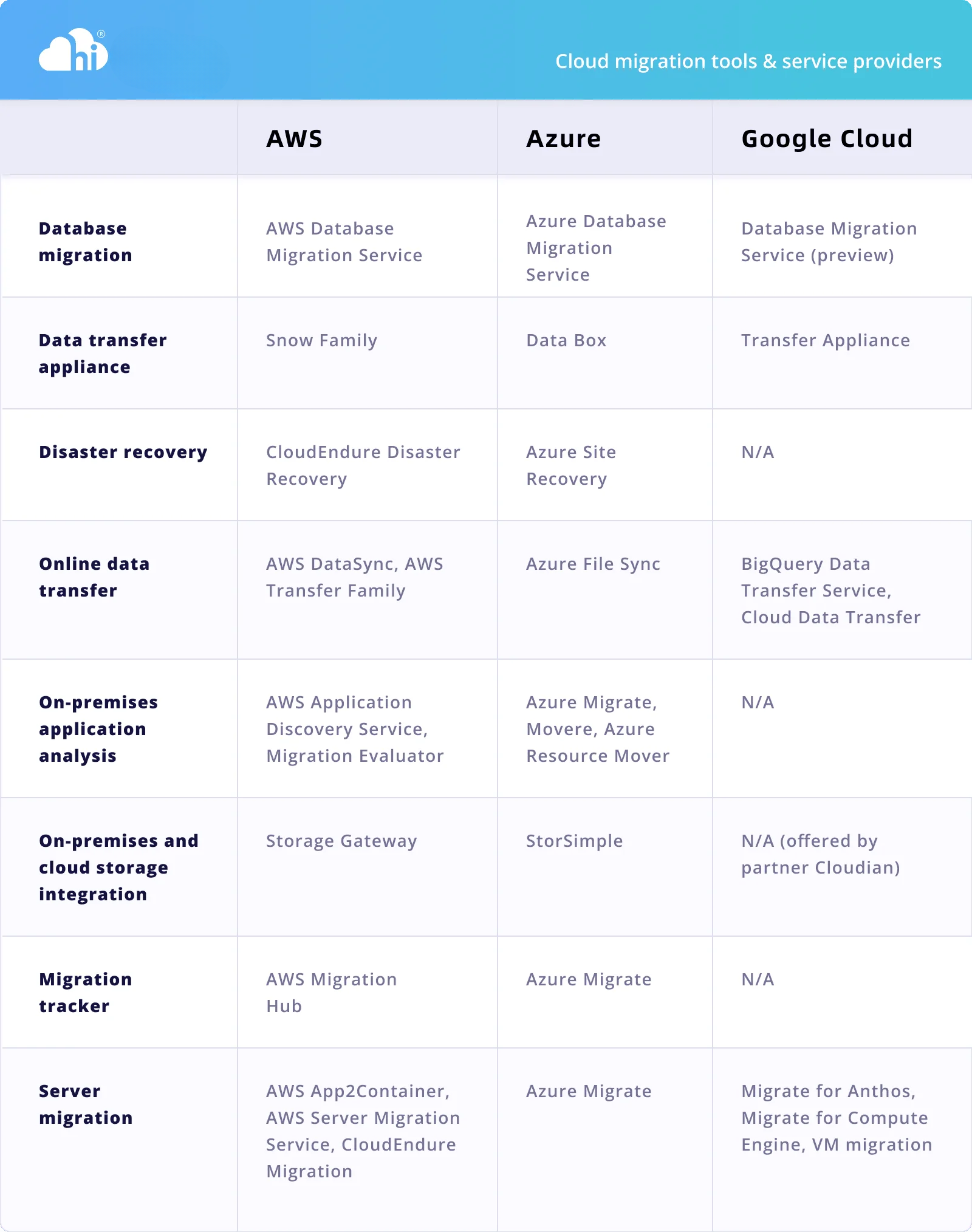
Hi Cloud’s expertise in cloud computing can help you navigate the complexity of cloud migration with public, hybrid and mult-cloud migration solutions. We work with major cloud providers, AWS, Google, Azure, CloudFlare, Alibaba and Tensecent to bring to you helpful migration tools and can tailor cloud migration plans for you. Contact us now for a free consultation.